
Trolling Motor Replacement Remotes Explained: Which Remote Fits Which Motor
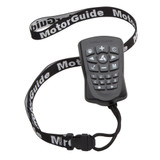
A trolling motor remote leads a hard life. It rides on a lanyard in the rain, gets dropped on the deck, gets stepped on, and — the ending nobody plans for — goes over the side. When it is lost or stops answering, the motor on the bow is usually fine. What is missing is the one part that talks to it.
That is where the mistakes start, because a replacement remote has to match more than the name on the motor. Every brand in this post sells more than one remote, and the remotes are built for different control systems. A remote made for a GPS-equipped motor is not the remote for the same motor sold without GPS, and the plain remote cannot run the GPS features. Brand is the first question. It is not the only one.
This post matches the replacement remotes we carry to the motors they actually fit: MotorGuide's two Xi remotes and the kits around them, Garmin's Force remote, and Lowrance's Ghost remote — plus the checks to run on your own motor before you order.
The short version
- Match the system, not just the brand. MotorGuide Xi owners face the sharpest fork in this post: PinPoint GPS motors take the GPS remote, non-GPS Xi motors take the standard FOB, and neither remote does the other's job.
- Your old remote is the best evidence. Its part number is printed on it, and a GPS remote is easy to recognize — it carries anchor, heading, and numbered route buttons the plain FOB does not have.
- MotorGuide no longer makes trolling motors. Manufacturing under the brand has ceased, so Xi owners will be keeping their motors running with service parts — remotes included — for as long as parts are supplied.
- Garmin and Lowrance keep it simpler. One Garmin remote covers the Force family. Lowrance's TMR-1 is built for the Ghost alone.
- Every replacement remote has to be synced to the motor before it works. On the MotorGuide PinPoint system that is a short button sequence, covered below.
- We do not stock Minn Kota remotes. This post covers the remotes we carry, and says so plainly. If your motor is a Minn Kota, the matching table below will not help you, and we would rather tell you that here than sell you the wrong part.
Before you replace it: the two cheap checks
A remote that seems dead is not always dead, and the two checks cost nothing.
Batteries first. These remotes run on small replaceable batteries, and a weak set can look exactly like a failed remote — short range, missed button presses, then nothing. The MotorGuide GPS remote takes two AAA batteries, and they are not included with the replacement, which tells you how routine swapping them is. Fresh batteries are the first test, not the last resort.
Pairing second. A remote and a motor that have lost their sync behave like strangers: the motor works from its other controls and ignores the handheld completely. Re-pairing the remote to the motor (the sequence is under "Syncing a replacement remote," below) restores remotes that were written off as broken. If a remote still does nothing with fresh batteries and a fresh pairing, then it is a replacement candidate — and the rest of this post is about buying the right one the first time.
MotorGuide: two remotes that are not interchangeable
MotorGuide's Xi3 and Xi5 motors were sold in two forms: with PinPoint GPS, or without it. The GPS is not a trim level you can spot from across the boat, but it decides which remote you need, because the two remotes are built for the two systems and do not substitute for each other.
How to tell which motor you have. A PinPoint-equipped motor says so on the motor head label — the word "PinPoint" is printed there. The remote tells the same story. The GPS remote has an anchor button, a heading button, and numbered buttons 1 through 8 for stored routes and positions. The standard remote is a small key fob with none of those. If the remote you are replacing had an anchor button, your motor has GPS. If it never did, it does not.
The GPS remote
The MotorGuide PinPoint GPS Replacement Remote ($119.99; MotorGuide part 8M0092071) is the factory replacement for the remote that shipped with PinPoint GPS motors. It runs the full GPS feature set from the handheld: Anchor mode to hold the boat on a fixed position, Heading Lock to hold a compass heading, Cruise Control to hold a speed, and Route Record — up to eight routes of up to four miles each, with up to eight stored positions to recall. In Anchor mode, the directional buttons jog the boat in 5-foot increments. The remote links to the motor over a 2.4 GHz wireless connection, runs on two AAA batteries (not included), and comes with a lanyard.
Its compatibility is narrow and exact: PinPoint GPS-equipped Xi3 and Xi5 motors only — GPS fitted at the factory, or the PinPoint module added afterward. It will not run a non-GPS Xi motor, and it will not run any other brand of motor.
The FOB
The MotorGuide Wireless Remote FOB for Xi Series Motors ($66.99; MotorGuide part 8M0092068) is the standard handheld for Xi motors without PinPoint GPS. It handles the basics — steering, speed, and propeller on and off — over the same 2.4 GHz wireless link. What it does not have is any GPS control: no anchor, no heading lock, no routes. On a non-GPS motor, nothing is missing. On a GPS motor, it is simply the wrong remote — the GPS features the motor came with need the GPS remote's controls, and the FOB does not have them.
Why this matters more than it used to
MotorGuide has stopped making trolling motors. The notice on MotorGuide's own support page says manufacturing under the MotorGuide brand has ceased, that future trolling motor production has moved to the Lowrance and Simrad brands, and that MotorGuide will continue to supply service parts "to the extent practicable" and honor its warranty coverage. In plain terms, there is no next MotorGuide motor to upgrade to. An Xi motor's useful life now depends on parts like these remotes staying available, which is a practical reason to replace a failing remote while the correct part is still being supplied — and, for owners who fish far from a dealer, a reasonable case for carrying a spare.
Adding GPS, and connecting the motor to a display
Two kits sit behind the remotes, and both come up when a remote question turns into a system question:
- Your Xi5 shipped without PinPoint GPS. The MotorGuide PinPoint GPS Navigation System ($428.99) is the upgrade kit. It adds the PinPoint GPS control module and includes the GPS handheld remote, bringing the same Anchor, Heading Lock, Cruise Control, and Route Record features as a motor that left the factory with GPS.
- Your PinPoint motor is not talking to your fishfinder. The MotorGuide PinPoint GPS Gateway Kit ($138.99; MotorGuide part 8M0092085) connects a PinPoint-equipped Xi3 or Xi5 to a compatible Lowrance fishfinder/chartplotter through an NMEA 2000 network, so the display can run the motor's PinPoint features. The kit is a 6-foot gateway cable and an NMEA 2000 T-connector. The boat needs an NMEA 2000 network for it to plug into — MotorGuide's setup instructions call for a network starter kit if the boat does not have one already.
Garmin: one remote for the Force family
Garmin keeps the Force lineup simple. The Garmin Force Trolling Motor Remote ($267.99; Garmin part 010-12833-00) is the replacement and spare remote for the Force, Force Kraken, and Force Pro motors. It is the most fully featured remote in this post: a sunlight-readable display, anchor lock and heading hold, autopilot controls, and point-and-go gesture steering — hold the button and point the remote where you want the boat to go, and the motor steers there. Programmable keys on the remote can also run functions on a Garmin chartplotter. And the remote floats, which is the correct feature for a part whose predecessor is often at the bottom of a lake.
Garmin also sells the Garmin Force Trolling Motor Foot Pedal ($364.99) separately. It is a wireless pedal rather than a handheld, so it is not a remote replacement — but it pairs with the same Force motors, and it is the other control Force owners ask us about when a remote fails.
Lowrance: one remote for the Ghost, and an honest gap on the Recon
The Lowrance TMR-1 Remote ($121.99; Lowrance part 000-15468-001) is built for one motor: the Lowrance Ghost. From anywhere on the boat it adjusts speed, changes direction, and sets the anchor, and it includes a lanyard. If your Lowrance motor is a Ghost, this is the remote. If it is not a Ghost, this is not the remote — the TMR-1 does not run Lowrance's other motors.
The newer Recon is the honest gap in our catalog. Every Recon motor we sell ships with Lowrance's Freesteer joystick remote in the box, and we stock the Lowrance Recon Wireless Foot Pedal ($560.99) on its own. What we do not stock is a standalone replacement Freesteer remote. If a Recon joystick is lost today, we cannot sell you one by itself, and we would rather flag that here than let the foot pedal's listing imply otherwise. The Recon itself is covered in our trolling motor sizing post.
One naming trap is worth a sentence: Lowrance's LR-1 sounds like it belongs in this post and does not. It is a remote for HDS LIVE displays, not for any trolling motor.
The matching table
| Your motor | The remote that fits | Our price |
|---|---|---|
| MotorGuide Xi3 or Xi5 with PinPoint GPS | PinPoint GPS Replacement Remote (8M0092071) | $119.99 |
| MotorGuide Xi3 or Xi5 without GPS | Wireless Remote FOB (8M0092068) | $66.99 |
| MotorGuide Xi5 without GPS, adding GPS | PinPoint GPS Navigation System (kit, includes the GPS remote) | $428.99 |
| Garmin Force, Force Kraken, or Force Pro | Force Trolling Motor Remote (010-12833-00) | $267.99 |
| Lowrance Ghost | TMR-1 Remote (000-15468-001) | $121.99 |
| Lowrance Recon | Freesteer joystick ships with the motor; no standalone replacement stocked | — |
Syncing a replacement remote
A new remote does nothing until it is synced to the motor. On the MotorGuide PinPoint system, MotorGuide's sequence is short: disconnect the trolling motor from its batteries and reconnect it, then — within 10 seconds — press the remote's left and right arrow buttons down together and hold them until the motor sounds an audible tone. The remote is paired. The same sequence pairs a wireless foot pedal. Sync or pair the remote before you head out.
The Garmin and Lowrance remotes pair wirelessly with their motors on the same principle, and both makers print their pairing steps in the motor's manual. One Garmin-specific note from its manual: the Force remote's compass has to be calibrated before point-and-go gesture steering reads correctly, so a new Garmin remote is not finished when it pairs — it is finished when it is calibrated.
Before you order
- ☐ Brand and exact motor model confirmed — Xi3, Xi5, Force, Force Kraken, Ghost, or Recon, not just the brand name
- ☐ The GPS question answered: does the motor have PinPoint GPS (check the head label, or the anchor button on the old remote)
- ☐ Part number read off the old remote, if you still have it, and matched against the table above
- ☐ Fresh batteries tried in the old remote first — two AAA in the MotorGuide GPS remote — before concluding it failed
- ☐ If your motor is a Minn Kota: we do not stock its remotes, and this post cannot match one for you
Browse the range: Trolling Motors · MotorGuide · Trolling Motor Sizing
A note on prices and specs: Prices in this post are our store prices as of the date above and can change without notice — the linked product page always shows the current price. We check specifications and compatibility against the manufacturer's information when we write each post, but manufacturers can change products without notice, so confirm the details on the product page before you order.